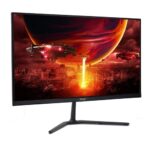
Acer Nitro KG240Y M5biip Review: High Refresh Gaming on a Budget in Nepal & Beyond


The Acer Nitro KG240Y M5biip stands as a compelling option for gamers seeking high performance without a prohibitive price tag. Positioned as an “easy recommendation for any up-and-coming gamer” and a “first-time builder’s dream,” this 23.8-inch Full HD (1920 x 1080) monitor offers a significant upgrade for many setups. Its core appeal lies in a “monstrous 180Hz refresh rate” and a rapid 1ms response time, coupled with an IPS panel that promises vibrant visuals and wide viewing angles. The integration of AMD FreeSync Premium further aims to deliver a smooth, tear-free gaming experience. This comprehensive review will delve into the Acer Nitro KG240Y M5biip’s technical specifications, evaluate its gaming prowess, examine the overall user experience, and provide a localized perspective, particularly for the Nepali market, to assist potential buyers in determining if this monitor aligns with their upgrade needs.
Acer Nitro KG240Y M5biip: Specifications at a Glance
The Acer Nitro KG240Y M5biip is engineered with a set of specifications tailored to provide a responsive and visually engaging experience for its price point. Understanding these details is crucial for assessing its capabilities.
Display Technology
The monitor features a 23.8-inch screen, providing a compact yet immersive display area for gaming and multimedia consumption. Its Full HD resolution (1920 x 1080 pixels) ensures crisp and detailed images, which is a standard and well-optimized resolution for this screen size, allowing for good visual fidelity without overly taxing a graphics card.
A key advantage of this monitor is its IPS (In-Plane Switching) panel technology. IPS panels are renowned for their superior color reproduction and wide viewing angles, typically 178° horizontally and vertically. This characteristic means that colors remain accurate and consistent even when viewed from extreme angles, a significant improvement over older TN (Twisted Nematic) panels which often suffer from color shifting. This broad viewing capability makes the monitor suitable not only for solo gaming but also for collaborative work or media consumption where multiple viewers might be present.
The refresh rate is a critical specification for gaming monitors. The KG240Y M5biip boasts a native 180Hz refresh rate, achievable when connected via DisplayPort 1.2. However, it is important to note that when using an HDMI 2.0 connection, the refresh rate is capped at 165Hz. This distinction is vital for users aiming for peak performance. A user who might typically rely on an HDMI cable, which is often included with monitors, would not experience the monitor’s maximum refresh rate. This highlights the necessity of using a DisplayPort cable to unlock the full 180Hz capability, potentially requiring an additional purchase if one is not already available. The monitor’s vertical scan range is specified from 48 Hz to 180 Hz, indicating its adaptability to varying frame rates.
Complementing the high refresh rate is a rapid 1ms Visual Response Boost (VRB) response time. This feature is designed to minimize motion blur and ghosting, ensuring that fast-moving objects in games appear sharp and clear, which is crucial for competitive gameplay. The display’s brightness stands at 250 cd/m² (nits), a common level for budget-friendly monitors, providing adequate illumination for most indoor environments. Its native contrast ratio is 1,000:1, with a dynamic contrast ratio extending to 100,000,000:1, contributing to a perceived depth in blacks and vibrancy in whites. The monitor also covers 99% of the sRGB color gamut, indicating good color accuracy for general use, gaming, and media consumption. An anti-glare screen coating is also present to reduce reflections, enhancing visibility in well-lit rooms.
Connectivity Options
The Acer Nitro KG240Y M5biip provides versatile connectivity with two HDMI 2.0 ports and one DisplayPort 1.2 input. The inclusion of two HDMI ports is a practical benefit, allowing users to connect multiple devices simultaneously, such as a gaming PC and a console, without constantly swapping cables. However, a critical point for performance-oriented users is that the DisplayPort 1.2 is the sole connection capable of delivering the monitor’s full 180Hz refresh rate. While HDMI offers broad compatibility with various devices, it will limit the refresh rate to 165Hz. Therefore, users prioritizing the highest refresh rate for PC gaming must ensure they utilize the DisplayPort connection.
Ergonomics & Physical Design
The physical design of the KG240Y M5biip emphasizes practicality and a modern aesthetic. Its stand offers only tilt adjustment, ranging from +20º to -5º. This limited adjustability is a common characteristic of monitors in this price segment, which often forgo more complex ergonomic features like height, swivel, or pivot adjustments to keep costs down. For users who require greater flexibility in monitor positioning due to desk setup or personal preference, the monitor’s VESA mount compatibility (75mm x 75mm) becomes a crucial feature. This allows the monitor to be integrated with aftermarket monitor arms or wall mounts, providing enhanced ergonomic flexibility at an additional cost.
A notable design element is Acer’s “ZeroFrame design,” which significantly minimizes bezels around the display. This “near bezel-less” approach maximizes screen real estate, creating a more immersive visual experience. It is particularly advantageous for multi-monitor setups, as it enables a “seamless, almost uninterrupted view” when placing multiple units side-by-side Furthermore, the stand itself has “one of the smallest footprints of any monitor,” contributing to a cleaner and less cluttered desk space.
Audio
Official specifications from Acer and some retailers indicate the presence of 2W built-in speakers. However, user experiences regarding these speakers present a significant inconsistency. Numerous user reviews report either a complete absence of functioning speakers or considerable disappointment with their quality and functionality. This discrepancy means that potential buyers cannot reliably depend on the built-in audio for their primary sound output. It is advisable to plan for external speakers or a gaming headset to ensure a satisfactory audio experience, as relying on the monitor’s integrated sound may lead to dissatisfaction.
Other Noteworthy Features
Beyond its core display and connectivity, the Acer Nitro KG240Y M5biip integrates several features aimed at enhancing the user’s experience. It supports AMD FreeSync Premium, a technology that dynamically synchronizes the monitor’s refresh rate with the graphics card’s frame rate. This synchronization effectively eliminates screen tearing and stuttering, resulting in a smoother and more fluid visual experience, particularly in fast-paced games. The monitor is also compatible with HDR10 content. While its brightness limitations affect the full impact of HDR, it can still process and display HDR signals. Acer has also incorporated “Vision Care” technologies, including Flicker-Free and a Blue Light Filter. These features are designed to reduce eye strain and fatigue during extended periods of use, promoting a more comfortable viewing experience. Additionally, the “Game View Technology” offers eight pre-set display modes (Action, Racing, Sport, User, Standard, ECO, Graphic, and Movie), allowing users to quickly optimize visuals for different types of content.
Unleashing Performance: Gaming with the KG240Y M5biip
The Acer Nitro KG240Y M5biip is designed with gaming at its forefront, leveraging its high refresh rate and rapid response time to deliver a competitive edge.
High Refresh Rate & Response Time Impact
The combination of a 180Hz refresh rate and 1ms VRB response time forms the cornerstone of this monitor’s gaming appeal. This pairing translates directly into “ultrasmooth 2D motion scenes,” “shorter frame rendering time,” and “lower input lag,” collectively providing gamers with a “serious competitive edge”. The rapid refresh rate means that the display updates more frequently, presenting more up-to-date visual information to the player. This is particularly beneficial in competitive titles where split-second reactions are crucial. For instance, a 60Hz monitor would “completely bottleneck” a system even if the computer is producing hundreds of frames, effectively wasting a significant amount of graphical processing power and leaving “40 frames per second on the cutting room floor”. The ability to see more frames per second faster can make a tangible difference in competitive scenarios, allowing players to react more quickly to in-game events.
AMD FreeSync Premium for Fluidity
AMD FreeSync Premium is a critical feature for ensuring a fluid gaming experience. It works by synchronizing the monitor’s refresh rate with the graphics card’s frame rate, effectively eliminating distracting screen tearing and stuttering. This results in a “smooth, vibrant gaming experience” where visual disruptions are minimized.
However, a closer examination of user experiences reveals a nuanced interaction between FreeSync and the monitor’s overdrive settings. While FreeSync Premium offers tear-free gameplay, activating it can restrict the monitor to its “normal” overdrive setting. This limitation means that the more aggressive “extreme” overdrive mode, which is designed for maximum motion clarity, may become unavailable. Users have reported that the “normal” overdrive setting can introduce “slight blur” or “noticeable ghosting” in very fast-paced scenarios, particularly when FreeSync is enabled. This presents a choice for competitive gamers: they can enjoy tear-free gameplay with FreeSync, potentially accepting minor ghosting, or they can disable FreeSync to enable “extreme” overdrive for superior motion clarity, thereby risking screen tearing. This trade-off is an important performance characteristic for those who prioritize every aspect of visual fluidity in their gaming.
Real-World Gaming Performance
Reviewers have thoroughly tested the KG240Y M5biip across various gaming titles, consistently observing positive results that underscore its capabilities. In graphically demanding games like Helldivers 2, the monitor delivered “beautiful and vibrant” visuals across diverse in-game environments, maintaining “crystal clear clarity”. This suggests the IPS panel’s color reproduction and detail rendering are well-suited for immersive experiences. For competitive titles such as Apex Legends, the high refresh rate proved to be a “serious edge,” making maps “crisp and infinitely more readable” and allowing players to acquire targets more quickly. Similarly, in Hunt: Showdown, a game known for its moody atmosphere and deep shadows, the monitor reportedly helped players “notice enemies lurking in shadows a bit easier” and land shots more effectively. Even less graphically intensive indie titles, such as Balatro, were noted to “look great on it,” demonstrating the monitor’s versatility across different game genres.
HDR Performance in Gaming vs. Media
The Acer Nitro KG240Y M5biip supports HDR10 content. However, its peak brightness of 250 nits represents a fundamental physical limitation for delivering a truly impactful High Dynamic Range experience. True HDR displays typically require significantly higher brightness levels to showcase the full spectrum of contrast and highlight details. As a result, reviews suggest that the HDR capabilities of this monitor are “more perceptible in videos than in games”. While it can still provide “vibrant tones and good definition” for multimedia content, it will not deliver the dazzling contrast and transformative visual punch associated with higher-end HDR monitors. This means that while HDR is a listed feature, it should be considered a basic implementation rather than a primary highlight for gaming.
Design & User Experience: Practicality Meets Performance
Beyond its raw specifications and gaming performance, the overall design and user experience of the Acer Nitro KG240Y M5biip contribute significantly to its appeal and practicality.
Aesthetics and Space-Saving Design
The monitor’s “ZeroFrame design” is a notable aesthetic and practical advantage. By minimizing the bezels around the display, it offers a “near bezel-less” appearance that maximizes screen real estate. This design not only enhances the visual immersion for a single monitor setup but is also particularly beneficial for creating “seamless, almost uninterrupted view” multi-monitor configurations. This allows users to expand their digital workspace or gaming field with minimal distraction from thick borders. Furthermore, the included stand is designed with “one of the smallest footprints of any monitor,” contributing to a cleaner and less cluttered desk environment.
Ergonomics and Adjustability
As previously noted, the monitor’s stand offers only tilt adjustment, ranging from +20º to -5º. This limited range of motion means that users cannot adjust the monitor’s height, swivel it horizontally, or pivot it vertically. For individuals who prioritize ergonomic comfort during long sessions or require specific positioning for multi-monitor setups, this limitation can be a significant drawback. The consequence of this design choice is that achieving optimal viewing angles or a more personalized setup may necessitate an additional investment in a VESA-compatible monitor arm. This transforms a seemingly minor design choice into a potential hidden cost for the end-user, impacting the overall “budget” value proposition if advanced adjustability is a key requirement.
Initial Setup and Customization
Setting up the KG240Y M5biip is described as a straightforward process, largely due to its simple snap-on base. While some users initially found the display “a bit dim out of the box” when compared to higher-end monitors, this was generally reported as easily remedied through adjustments. The monitor provides “tons of options under the hood to really dial in the visuals”. Navigation of the intuitive OSD (On-Screen Display) menu is managed via a directional joystick located at the back of the monitor, complemented by additional hotkeys for shortcuts. This interface allows for quick adjustments to essential settings such as brightness, contrast, and color temperature. Users can also access features like “Black Boost,” designed to improve visibility in dark scenes by manipulating the gamma curve, and various “Game View Technology” presets to optimize visuals for different content types.
Eye Comfort Features
Recognizing the importance of eye health during prolonged screen time, Acer has integrated its “Vision Care” technologies into the KG240Y M5biip. These include Flicker-Free technology, which eliminates screen flickering that can cause eye strain, and a Blue Light Filter, which reduces harmful blue light emissions. These features collectively aim to minimize eye fatigue and discomfort, contributing to a more comfortable viewing experience for both gaming and general productivity tasks.
Text Clarity for Productivity
For general productivity and office work, the 1920×1080 resolution on a 23.8-inch screen results in a pixel density of approximately 92 PPI (pixels per inch. This pixel density is generally considered adequate for most users, providing clear text without noticeable pixelation, particularly when compared to the same 1080p resolution stretched across larger 27-inch displays where individual pixels can become more discernible The anti-glare screen coating further enhances comfort during work hours by reducing reflections from ambient light sources. While not a 4K display, for standard office applications, web browsing, and document editing, the text clarity is generally satisfactory.
Pros & Cons: A Balanced Perspective
To provide a comprehensive understanding of the Acer Nitro KG240Y M5biip, a balanced look at its advantages and considerations is essential.
Advantages (Pros)
- Exceptional Value for Performance: The monitor offers a compelling combination of a high 180Hz refresh rate and a rapid 1ms response time on an IPS panel at a very competitive price point. This makes it an excellent “bang for your buck” proposition for many users.
- Smooth & Responsive Gaming: The high refresh rate, coupled with low input lag, translates to “ultra-smooth” motion and a significant competitive advantage in fast-paced games, allowing for quicker reactions and more fluid visuals.
- Vibrant IPS Panel: The In-Plane Switching panel delivers “crisp, true-to-life colors” and wide 178° viewing angles, enhancing the visual quality for both immersive gaming and general media consumption.
- AMD FreeSync Premium: This adaptive synchronization technology effectively eliminates screen tearing and stuttering, ensuring a fluid and visually consistent gameplay experience.
- Sleek ZeroFrame Design: The minimal bezel design maximizes screen space, providing a more immersive viewing experience and making it ideal for seamless multi-monitor setups.
- User-Friendly Setup & Customization: The monitor is easy to assemble, and its intuitive OSD controls, accessed via a joystick, offer various game modes and picture adjustments for visual optimization.
- Eye Care Technologies: Features like Flicker-Free and a Blue Light Filter are integrated to reduce eye strain and promote viewing comfort during extended use.
Considerations (Cons)
- Limited Stand Ergonomics: The tilt-only stand lacks height, swivel, or pivot adjustments. This can be a significant ergonomic drawback for users who require more flexible positioning without investing in a separate VESA-compatible monitor arm.
- Inconsistent Built-in Speakers: Despite being listed in official specifications, numerous user reports indicate either non-existent or non-functional built-in speakers. This inconsistency means that users should plan for external audio solutions.
- Basic HDR Implementation: While HDR10 is supported, the monitor’s 250 nits peak brightness means it offers a very basic HDR experience. It is more noticeable in videos than in games and does not compare to the impactful visuals of higher-end HDR displays.
- FreeSync Overdrive Conflict: Activating AMD FreeSync Premium can restrict the monitor to its “normal” overdrive setting, potentially introducing minor ghosting or blur in very fast-paced scenes. This forces users to choose between tear-free gameplay and optimal motion clarity.
- Quality Control Concerns: A significant number of user reviews highlight recurring quality control issues. These include reports of early unit failure, the appearance of bright vertical lines on the screen, frequent dead pixels, and flickering at higher refresh rates. This consistent user feedback regarding critical quality control issues poses a significant risk to Acer’s brand reputation in the budget segment. Some users have directly advised against purchasing Acer monitors due to “defective panel[s] with lines and stuff and how hard it is to return or replace with Acer customer care”. This suggests a potential “panel lottery,” where some users receive flawless units while others encounter frustrating defects, raising concerns about long-term reliability and post-purchase support. Such issues can severely impact consumer trust and overall satisfaction, despite the attractive initial price point.
- Power-off/Sleep Display Bug: Some users have reported a minor but annoying bug where the monitor requires unplugging and replugging after powering off or going to sleep to display properly.
Regional Spotlight: Acer KG240Y M5biip Price & Availability in Nepal
Understanding the local market dynamics is crucial for consumers in Nepal considering the Acer Nitro KG240Y M5biip.
Local Model Naming & Pricing
In the Nepali market, the Acer Nitro KG240Y M5biip appears to be commonly available under the model designation “Acer Nitro VG240Y 24-inch Gaming Monitor”. This variant largely matches the core specifications of the KG240Y M5biip, including the 180Hz IPS panel, 1ms GTG response time, Full HD resolution, HDR10 support, and 99% sRGB color gamut. The Acer Nitro VG240Y 24-inch Gaming Monitor (180Hz) is priced at NPR 22,000 at retailers such as Star Hifi Store. Purchases exceeding Rs. 25,000 often qualify for free shipping across Nepal.
Is the Acer Nitro KG240Y M5biip Right for You?
Determining if the Acer Nitro KG240Y M5biip is the right choice depends on individual needs, priorities, and budget considerations.
Ideal User Profiles
- Entry-Level Gamers & First-Time PC Builders: This monitor is an “ideal first monitor” due to its strong performance-to-price ratio. It offers a substantial upgrade from standard 60Hz displays, providing a noticeable improvement in fluidity and responsiveness for new PC setups.
- Budget-Conscious Competitive Gamers: For individuals seeking a tangible competitive edge in esports titles without investing in premium hardware, the 180Hz refresh rate and AMD FreeSync Premium are highly appealing. These features contribute directly to a smoother and more responsive gaming experience.
- Users Needing a Cost-Effective Secondary Display: Its compact 23.8-inch size and VESA compatibility make it a practical choice for expanding screen real estate in a multi-monitor setup, offering good visual quality for general tasks alongside a primary display.
Key Considerations Before Purchase
- Ergonomics: Potential buyers should be aware that the stand offers only tilt adjustment. If advanced adjustability, such as height, swivel, or pivot, is crucial for ergonomic comfort or specific multi-monitor configurations, factoring in the potential need for a VESA-compatible monitor arm is essential.
- Audio Solutions: It is advisable to plan for external speakers or a gaming headset. User reports regarding the built-in speakers are inconsistent, with many indicating non-existent or non-functional audio, making them unreliable for primary sound output.
- HDR Expectations: While HDR10 is supported, the monitor’s 250 nits peak brightness means its HDR capabilities are basic. Users should understand that it will not deliver a high-impact visual experience comparable to true HDR monitors.
- Overdrive Settings: For competitive gamers, it is important to note that activating FreeSync Premium can restrict the monitor to “normal” overdrive, potentially causing minor ghosting or blur in very fast-paced scenes. Users may need to experiment with settings and potentially disable FreeSync for optimal motion clarity.
- Quality Assurance: Given the recurring user feedback concerning quality control issues, such as dead pixels, vertical lines, or early unit failures, purchasing from a retailer with a robust return or exchange policy is highly recommended to mitigate potential risks.
Overall Value Proposition
For its price point, the Acer Nitro KG240Y M5biip delivers a robust gaming experience, particularly for those upgrading from older, lower refresh rate displays. Its IPS panel ensures good visuals for both gaming and general use, making it a versatile choice within the budget segment. While it presents a few compromises typical of its price category, its core performance benefits, especially the high refresh rate and IPS panel, often outweigh these drawbacks.
Conclusion: A Strong Contender in the Budget Gaming Arena
The Acer Nitro KG240Y M5biip, often identified as the Acer Nitro VG240Y M3 in markets like Nepal, emerges as a highly capable and affordable 180Hz IPS gaming monitor. It successfully delivers on its promise of a fluid and responsive gaming experience, primarily due to its high refresh rate, rapid 1ms response time, and the tear-eliminating AMD FreeSync Premium technology. The ZeroFrame design enhances visual appeal and utility, particularly for multi-monitor setups, while the vibrant IPS panel ensures good image quality for both immersive gaming and general productivity tasks.
However, like many budget-friendly options, this monitor comes with a few compromises. The tilt-only stand limits ergonomic flexibility, potentially necessitating an additional investment in a VESA mount. The inconsistent performance or outright absence of built-in speakers means users should plan for external audio solutions. Furthermore, the basic HDR implementation, constrained by the 250 nits brightness, will not provide a truly transformative visual experience compared to higher-end HDR displays. For competitive gamers, the trade-off between FreeSync and optimal overdrive settings for motion clarity is a notable consideration.
More critically, recurring user feedback regarding quality control issues, including early unit failures, the appearance of bright vertical lines, and frequent dead pixels, represents a significant concern. This suggests a potential “panel lottery” that can impact long-term satisfaction and underscores the importance of purchasing from a reputable retailer with a robust warranty and return policy.
Despite these considerations, for budget-conscious gamers and first-time PC builders, the Acer Nitro KG240Y M5biip remains a compelling choice. Its performance benefits, particularly the high refresh rate and IPS panel, often provide significant value at its price point. In the Nepali market, while it faces stiff competition on price from other 180Hz IPS alternatives, its established brand presence and robust feature set still position it as a strong option for those seeking to elevate their gaming experience.